Wednesday, 20 July 2011

Google Android 3.2 with Zoom Mode & Pixel Scale

Google officially makes Android Honeycomb 3.2 to go live. Android 3.2 contribute some handy features for both users and developers. Though it is not a major update but has introduced new compatibility Zoom Mode.

Android 3.2 compatibility zoom mode enable the users to view fixed apps on large screens. It is made possible by Pixel-scale alternative instead Standard UI.  They cannot support screens as large as they are running.

 But it delivers application in a small screen area and then scales the pixels to fill the current screen. The compatibility support is accessible from menu icon found on the system bar.

The new feature also includes a fine optimization technique that is applicable for wide range of tablet devices. And further provide Media Sync from SD card, where users can directly load media files from SD card to app that use them.

A system facility makes the files accessible to apps from the system media store. The new screen mode may not be applicable for all applications. Users can also keep Zoom mode in their control using ON/OFF.

The Android 3.2 gives extended API support for developers to manage screen support.  The new resource qualifiers and manifest attributes give developers a control over how apps displayed on different sizes.

Get more details from here

Maxx Mobiles unveils Maxx Super MX424 Big Battery Series Phone


Maxx Mobiles has launched Maxx Super MX424 ‘Big Battery Series’ phone in India. MX424 with 2200 mAh battery capacity is priced at Rs 2,727. This was rolled out to rope both rural and small town people who always long for high battery usage.

Especially it will be liked by youth since they may get higher talk time. It sounds to be budget-friendly and could offer extended battery life. Maxx Rave, Hexa, Buzz are already in the list while MX424 is launched after great response for their Big Battery Series.
Maxx Super MX424 Specifications

  • Dual SIM Phone
  • 2200 mAh Battery
  • 11 hrs to 17 hrs talk time
  • 460 hrs to 1150 hrs Standby time
  • Mp3 player (MP3/ AAC/ WAV formats)
  • Video player (3GPP/AVI/MP4 formats)
  • 2.4 inch TFT screen
  • 1.3 MP camera
  • LED Flash
  • Wireless FM
  • Dedicated keys for music and camera
  • 2.5mm audio jack
  • 8 GB expandable battery
  • Java platform
  • Twitter, Facebook, Google and Yahoo launcher applications
Maxx Super MX424 is available throughout India. So if you wish to have a lengthy conversation just try this stuff.

Tuesday, 19 July 2011

Nokia's First Windows Phone 7 Sea Ray Video leaked!

It is going to be an exciting video clip for Nokia fans. Yes, Nokia's first Windows Phone 7 'SeaRay' was caught accidentally when found on the floor. This 'super confidential' WP7 codenamed as 'SeaRay' look exactly as Nokia N9.

It runs on Windows Phone 7 Mango and may have some virtual buttons. This device is supposed to have additional hardware architecture. It is anticipated that it may come up with 8 megapixel Carl Zeiss lens.I hope it may come up with front-facing camera.

If you take a close watch at this video you may encounter a small aperture on the top right. If not then lets us wait for Samsung Galaxy S2. And I guess Nokia Sea Ray would be transferred through Vodafone.


source

EAFT Technologies unveils MagicTile Marathon Tablet at Rs 29900

The Bangalore based product engineering company EAFT Technologies has launched MagicTile Marathon Tablet. This homegrown 3G enabled tablet is priced at Rs 29,900.They have projected this product to rope youngsters, who are 'Net Worms.'

Marathon boasts Android 2.2,NVIDIA Tegra 2X fast browser,Multi-touch capacitive screen,3G connectivity, Wi-Fi, Bluetooth® 2.1, USB 2.0, 1080p video playback, Flash 10.1LCD and over 8 hours of continuous battery life.

The company claims that the product may carry out multi-tasking without slowing down the system speed.And you may also have access to e-book,internet, mail, watch movies, play music, social networking and games.
The EAFT App store has You Tube Aggregator, Weather, Word Puzzle, Sudoku, Shopping list, Scribe, Number jumble,  periodic table, nGadget, Google books, NPTEl, Indian festival Calendar and logarithm table.


MagicTile – Marathon Specifications

  • 10.1” LCD Touch Display
  • Capacitive Multi-touch Screen
  • 1024x600 Maximum Resolution
  • Tegra2 @ 1 GHz and 512 MB RAM
  • Android 2.2 Operating System
  • Capacitive Touch Screen type
  • Storage Capacity Upto 16GB
  • Battery Back-up 8 hrs
  • 3G Data Only
  • 802.11 b/g wireless Wireless Connection
  • 1080p HD Video Support
  • 1.3 MP Camera
  • Micro SD for storage expansion
  • Built in Stereo speakers and earphone jack
  • 1 USB 2.0 Slot
  • HDMI port
  • 3.5 mm earphone
  • Docking Port
  • EAFT AppStore
  • Built on SoftToyzTM
  • Remote Management (Optional)
  • Multiple App Stores including Android Market support
  • 3D User Interface
  • Package Includes 16GB card, Charger, earphone and Hungama voucher
 Advantages of Marathon

  • 10.1 inch LCD
  • Educational and entertainment content
  • Full 8hours of rich media playback and a 14 hour standby.
  • Find friends or use auto-match to play multiplayer  
  • Full-size album view
  • Office App, Gooogle map
  • Unified inbox, split-screen view, and expansive onscreen multi touch keyboard
  • 1080p High Definition Video Playback
  • Access to more than 100,000 apps on the Android Store
Disadvantages of Marathon
  • Hefty Price tag
  • Android OS could have been an updated version
  • Multitasking with NVIDIA Tegra 2 Processor?
  • Poor Camera just 1.3 MP


But any how we should be proud to get a tablet from Indian company. Though Olive telecommunications have launched but EATF claims MagicTile Marathon as the finest product.

Let us see whether this product would compete with Apple iPad.

Sunday, 17 July 2011

Microsoft Windows Server Solution Phone Connector for Windows Home Server 2011

It is really a good news for people Windows Home Server 2011 and Windows Phone 7. Yes, Microsoft has released Windows Phone 7 Connector to customize your home, business and server virtually. You may just access them through Windows Phone 7 phone.

The Windows Server Solution Phone Connector features Alerts, Device access, User account access,Media, Music, Photos, Videos and Live Tile application.

This plugin is also found compatible with Windows Small Business Server 2011 Essentials, and Windows Storage Server 2008 R2 Essentials.

Just learn about the details of app here,
 
Alerts:

After you complete the authentication steps for the server, an alerts listing launches on the phone. This feature brings the Alert Viewer from the server to the phone. If an alert is displayed as white, it is active and included in the alert count. If an alert is dimmed, the alert is disabled, and it is not included in the alert count. You can click on any alert item to view the full alert text, just as on a computer. Contextual menu options include enabling or disabling an alert, and performing a repair action if one was assigned to this alert.
Devices:
The devices panorama enables you to:
  • View details about all computers that are connected to the server (Windows or Mac).
  • View the backup status that every device last reported to the server.
  • Start or stop a backup for any computer or the server (from the contextual menu).
Users
The users panorama enables you to perform basic user management tasks, including:
  • View user account details.
  • Enable or disable a user account.
  • Change a user account password.
Disabling a user account from your phone is the same as disabling the account by using the dashboard on a computer. The user’s access to Remote Web Access, the phone application, and any server resources are turned off. You can re-enable a user account after it is disabled.
Media
The media panorama is not available on Windows Small Business Server 2011 Essentials. It is available on Windows Home Server 2011 and Windows Storage Server 2008 R2 Essentials only.
The media panorama lets you discover and view streams of media elements that you stored on your server in appropriate shared folders. For example, if you do not place a song in the music share, it will not be discoverable by using the phone application. Subfolders are recognized.
Music
MP3 songs that are not protected by digital rights management are streamed directly from the server to your phone. Album art is also transported. Your library is searchable and can be organized in different views to help you find what you want.
It is not possible to stream music while tethered to a computer and connected to a Microsoft Zune® application.
Photos
With the photos panorama, you can:
  • Discover all .png and .jpg images that are stored in the Pictures shared folder and subfolders on the server.
  • Open a picture full-screen to view it on the phone.
  • Save a copy of the picture to the phone using its original dimensions and resolution (to be viewed later in the built-in Pictures hub of any Windows Phone 7 phone).
  • Take a picture with the phone’s camera and upload it to the server.
  • Upload any picture that is stored in the Pictures hub of the phone to the server.
Videos
The videos panorama allows you to discover and view videos that are stored on your server in the Videos shared folder. Subfolders are recognized. Even though videos may be discoverable by this feature, not all formats can be streamed. The server and Windows Phone 7 prohibit the ability to create and accept streams from certain formats.
For details about which video formats can be streamed from the server and accepted by the phone, see Supported Media Codecs for Windows Phone.
Accounts
With the account panorama, you can:
  • Change the application settings. At this time, the opt-in for Live Tile support is the only setting available.
  • Log out of the current user account and select a different account.
  • Launch the about screen. You can review the license terms, privacy statement, and version number of your application.
Live Tile
If you pin the Live Tile application to the home screen of your Windows Phone 7, you can see a variety of at-a-glance information without launching the application (see Figure 6). An opt-in using the settings menu is required. For more information, see the Accounts section.
The at-a-glance information includes:
  • Count and type of network health alerts
  • Percentage of storage use on your main disk
  • Name of the server that is sending this information
The server that sends Live Tile updates does not need to correspond to the server that is set for auto-logon. After enabling Live Tile support, it can take up to 30 minutes for the Microsoft Push-Notification Service to start updating your Live Tile.
 The server side plug-in can be downloaded from http://go.microsoft.com/fwlink/?LinkId=214671 , and Windows Phone 7 Application from Zune market place through PC or by phone and search for My Home Server

For detailed information just connect http://technet.microsoft.com/en-us/library/hh319881.aspx.

source

Saturday, 16 July 2011

Google Minus pings about who ditched you out from Google+ Circle

Google is competing to escalate high in social networking arena. This is confirmed by it new Google Plus project.Google+ is not a new concept by launched to defeat its rival Facebook. Even it was stated that Facebook CEO Mark Zuckerberg has more fan follows in Google +.

This implies that Mark is marching to unveil new alterations to defeat Google. But it was estimate that Google+ may cross 20 million users by this weekend. When you are enrolled to Google Plus you may get notification immediately.

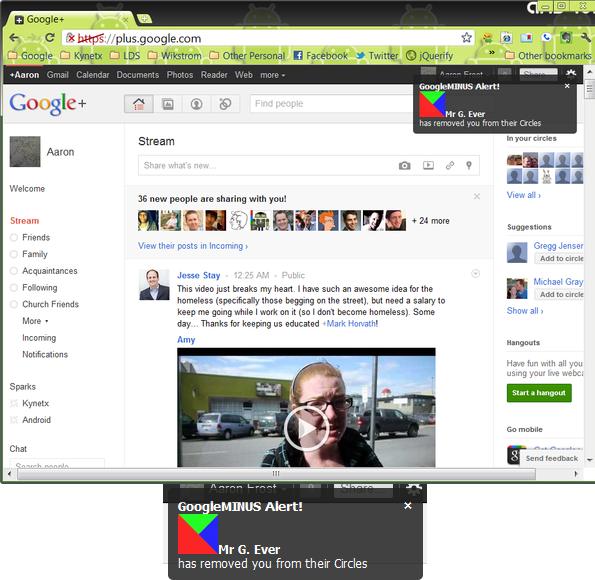
But can you identify if someone remove you from circle? Yes, we can.Aaron Frost has developed Google Minus,a browser extension will let you know the person who remove you from Google+ circle.On installation of Kynetx to your web browser you will get a pop-up message when anyone expel you out.

It is found that Google Minus is compatible with Google Chrome, firefox and Safari.Prior to that you have to create an account in Kynetx website to validate your Facebook or Google account. Once if it is done you may install Kynetx app including Google Minus.


Google- gives developers to utilize and create apps. And further it gives additional functionality.Aaron Frost said that you may get new exciting features in future.

Google is rocking with 13% increase in profit and tops the chart of UK share with 92%. And Larry Page has called for business venture through Google Plus.

source

LG Optimus Pro & LG Optimus Net Cheap Social Networking Phones launch in India?

It sounds to be a great news for social network fans. As LG is set to launch LG Optimus Pro and LG Optimus Net. They are completely powered by Android and most importantly priced to be cheap phones. If it is social networking phone then it should have high-speed processors?

I hope it is the best gadget for business people. And it look close to Black Berry mobile phone.The LG Optimus Pro technical specifications may carry,
  • 2.8 inch capacitive screen
  • Full QWERTY Keyboard
  • 3 megapixel camera
  • 800MHz processor
  • HSDPA connectivity
  • 1500mAh battery
  • Android 2.3 Gingerbread
  • WiFi, Bluetooth and GPS.
  • 150 MB Memory for Applications Installation. The LG Optimus Pro C660 is anticipated to be priced at  179 €.  LG Optimus Net may carry same specifications as that of  Pro but differ by 3.2 inch screen display.And it  may couple dedicated keys for e-mail and planning. They may be first unveiled in Europe and followed by 30 countries.
    Any how the Indian price of LG Optimus Pro may be around Rs 10000 to 13000. This is really a tough time for HTC Smartphones!

    Let us wait and catch its ability whether it may give decent access to Facebook, Twitter, Google+, Photovine?


source